
The multi-agent vs single-prompt split this paper proposed has aged well. In 2026 the bigger lesson is that neither alone is enough — you also need the lock layer (lock-layer-pattern-paper) to keep brand and client identity from drifting between turns, and typed references (typed-reference-composition) to keep the brief's artifacts (style guides, prior briefs, examples) from contaminating each other. The original paper's JSON stage-validation idea generalises to every agentic system I have built since.
Abstract
Automated briefing systems are emerging as vital tools for streamlining communication and accelerating the exchange of detailed project information across diverse business functions. This research article examines two key architectures — Single System Prompt Agents and Multi-Agent Systems — as applied to production briefing use cases. By integrating client and project profiles encoded in structured JSON formats with conversational stage validation, these systems aim to reduce human effort, minimize errors, and enhance context precision. The multi-agent approach, in particular, addresses the rigidity and token management challenges inherent in single prompt systems, thereby enabling complex, nuanced interactions that cater to the needs of creative production industries.
─────────────────────────────
Introduction
Modern businesses across Human Resources, onboarding, sales, healthcare, legal, finance, and production increasingly rely on automated tools to deliver consistent and coherent project briefings. Automated briefing systems, powered by large language models (LLMs), offer robust solutions to otherwise repetitive communication tasks. In our research, we focus on production briefing—where detailed client and project data are utilized—and compare two distinct yet complementary methodologies:
- Single System Prompt Agents employ a singular, static configuration to manage the entire conversation process, offering simplicity and rapid deployment for routine tasks.
- Multi-Agent Systems break the interaction into modular stages, with each agent handling a specific aspect of the conversation. This approach significantly enhances context retention and responsiveness to complex queries.
Both methods demonstrate unique strengths and trade-offs, and when integrated with structured data inputs, they promise to deliver automated briefings that are both adaptive and verifiable.
Note: This document represents early research in production briefing use cases. The approaches and details provided here may evolve over time.
─────────────────────────────
System Context and Structures
Before diving into conversation prompts, it is essential to understand the underlying data structures that drive our system. Our use case centers on production briefing, and we utilize detailed client and project profiles in JSON format.
Client and Project Data Structures
json{
"clientProfile": {
  "template": "The client is Alex, CEO, from USA San Francisco; company: Online. About the company: A tech company specializing in innovative solutions. The company operates in Technology."
},
"mainInformation": {
  "timeCreated": "2024-06-01T10:00:00Z",
  "projectType": "short-term",
  "projectTypeDescription": "Short-term production project",
  "description": "A promotional video for our new product launch",
  "language": "English",
  "company": "Example Company",
  "companyDescription": "A tech company specializing in innovative solutions",
  "briefCreationTime": "2024-06-01T10:00:00Z"
},
"projectInformation": {
  "productName": "Project Alpha",
  "briefType": "Video Production",
  "task": ["Create video script", "Shoot video", "Edit video"],
  "contentType": "Video",
  "goal": "Increase brand awareness and drive sales",
  "format": "MP4",
  "deliverables": ["Teaser", "Full video"],
  "preferences": "Engaging visuals and dynamic transitions",
  "creative": true
},
"budgetTimeline": {
  "budget": "5000 USD",
  "timeline": "4 weeks"
},
"summary": {
  "projectSummary": "Comprehensive project brief",
  "budget": "5000 USD",
  "startDate": "Start Date",
  "finishDate": "Finish Date"
}
}
─────────────────────────────
Single System Prompt Agents
Single System Prompt Agents use one static configuration to drive all interactions. They are well suited for routine tasks with predictable conversational patterns but may struggle with the nuances of complex projects.
Advantages
- Quick deployment and easy maintenance
- Minimal computational overhead
- Effective for routine, predictable interactions
Limitations
- Rigid structure may not capture subtleties in complex projects
- Higher risk of logical errors ("hallucinations") if inputs deviate from expectations
- Token management challenges in longer conversations can lead to incomplete processing
Conversation Stages for Production Briefing (Single System)
A typical production briefing conversation includes these stages:
1.Introduction: Personalized greeting and initial inquiry.
2.Main Vision: Request detailed project objectives and vision.
3.Production Service: Ask for specifics—content type, goals, format, and deliverables.
4.Budget and Timeline: Discuss financial constraints and scheduling details.
5.Additional Information: Gather any extra preferences and create the final project summary.
Example: Single System Prompt with JSON Validation
json// Single System prompt example with validation flags:

Never forget your name is "{agent_name}". You are a "{role}".
Introduce yourself as an AI assistant.
You act on behalf of "{agent_name}". About "{agent_name}": "{about}".
This brief happens now on the "Digital Production" platform:
"Digital Production Creators Platform" connects creators with customers seeking creative production outputs. Clients submit briefs, receive AI-generated suggestions, adjust them, and track progress.
Your task is to support a production briefing for a "{project_type}" project described as "{type_description}".
Use short messages (up to two sentences), except when a JSON response is required.

**Conversation Stage Examples:**

1.  Introduction:
 "Welcome {client_name}, it's great to have you here. We will start your {project_type} project for {company_name}. How are you today?"

2. Main Vision (JSON response):
{
"Message": "Could you tell us more about the core objectives of your project?",
"Vision_Status": false
}

3. Production Service (JSON response):
{
"Message": "To ensure the best-fit service, please specify the content type, main goals, preferred format, and any essential deliverables. Do you require a creative pre-production session?",
"Service_Status": false
}

4. Budget and Timeline (JSON response):
{
"Message": "To better plan, could you specify the budget, start date, and finish date for the project? Please provide all in one message.",
"Budget_Status": false
}

5. Additional Information (JSON response):
{
"Output": "We have collected all necessary details and are ready to provide final brief options. Would you like to add any additional notes?",
"Status": "true"
}
─────────────────────────────
Multi-Agent Systems
Multi-Agent Systems partition the conversation into modular stages, with each stage managed by a dedicated agent. This improves context retention, handles complex queries more effectively, and reduces errors thanks to clear validation at each interaction stage.
Unlike the single prompt framework, Multi-Agent Systems enhance capabilities by breaking down the task into specialized, finite stages handled by distinct agents. Each agent in the multi-agent architecture targets specific informational needs of the task, providing precision and improved adaptability in complex scenarios. By focusing on a modular approach, these systems can better retain relevant context, adjust to nuanced demands, and minimize errors.
Note: Please refer to the image below which illustrates our agentic structure for the production briefing use case.
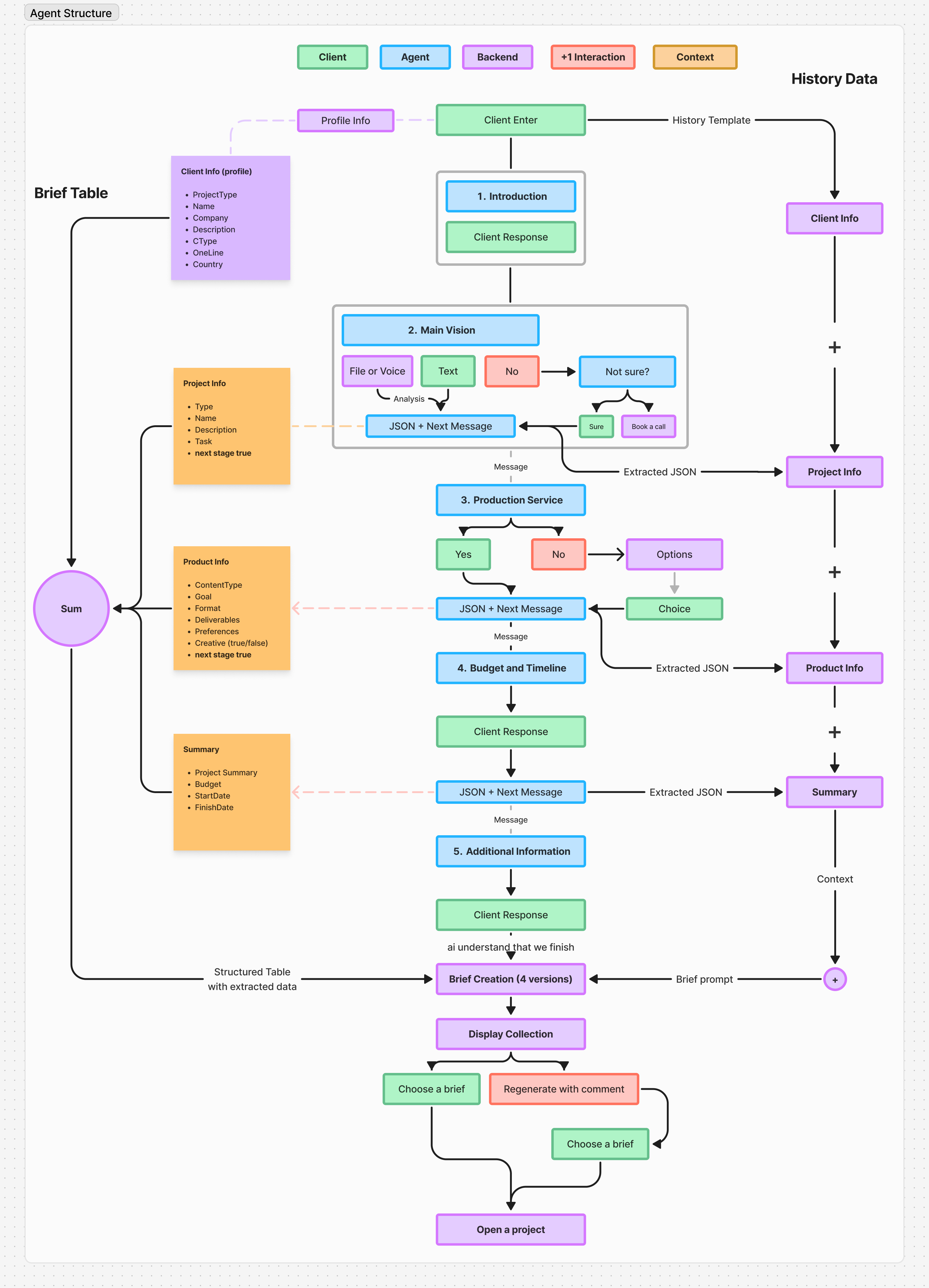
Detailed Agentic Structure
For our production briefing use case, the conversation is divided into these five stages:
Introduction Stage:
Purpose: Begin with a personalized greeting and initial inquiry.
Example:
jsonAs "{agent_name}", your task is to start the conversation with the client.
Example: "Welcome {client_name}, it's great to have you here. We now start your {project_type} project for {company_name}. How is your day so far?"
Main Vision Stage:
Purpose: Capture detailed project objectives and overall vision.
Example (JSON response with status flag):
json{
"Message": "Could you tell us more about the core objectives of your project?",
"Type": "{project_type}",
"Name": "{project_name}",
"Description": "{description}",
"TaskInput": "The client needs {task_input}",
"Vision_Status": false
}
Production Service Stage:
Purpose: Gather comprehensive production details, including content type, goals, format, deliverables, and creative requirements.
Example (JSON response with status flag):
json{
"Message": "To ensure the best-fit production service, could you specify the content type, main goals, preferred format, and essential deliverables? Also, please indicate if you require a creative pre-production session.",
"Product Info": "",
"ContentType": "",
"Goal": "",
"Format": "",
"Deliverables": "",
"Preferences": "",
"Creative": "false",
"Service_Status": false
}
Budget and Timeline Stage:
Purpose: Record budget details and project scheduling (start and finish dates).
Example (JSON response with status flag):
json{
"Message": "To better plan, could you specify the budget, start date, and finish date for the project? Please answer in one message.",
"Budget_Status": false
}
Additional Information Stage:
Purpose: Finalize the briefing by gathering any extra preferences or details, then compile the complete project summary.
Example (JSON response with status flag):
json{
"Output": "We have collected all required details and are ready to provide final brief options. Would you like to add any additional notes?",
"Status": "true"
}
Key Benefits:
- Enhanced Precision and Contextual Understanding: By having dedicated agents for each stage, the system improves the accuracy of data collection and processing.
- Tailored Client Interactions: The system's capacity to adjust and focus on specific needs during each stage allows for personalized support.
- Time Efficiency and Scalability: These systems significantly reduce project setup time and can be adapted to sectors like healthcare, HR, and sales.
─────────────────────────────
Detailed Message Template Prompts
Below are the detailed original prompts for both the full system and each conversation stage, ensuring complete clarity and adherence to our operational needs.
System Prompt (Full)
jsonSystemPrompt:
"Never forget your name is "{agent_name}". You are a "{Role}".
Introduce yourself as an AI assistant.
You act on behalf of "{agent_name}". About "{agent_name}": "{about}".
This brief happens now on the "Digital Production" platform:
"Digital Production Creators Platform is an online service that connects creators with customers seeking quality content, marketing, or other types of creative production outputs. The platform offers a streamlined process where customers can sign up, submit a brief, and receive AI-generated suggestions for creators and packages tailored to their specific needs. Customers can review and adjust these suggestions before proceeding to payment. They are then provided with a dedicated space for tracking their project's progress, communicating with support, and ultimately receiving their finished product on time from the chosen creator or team. Meanwhile, creators have access to a personal workspace where they can showcase their portfolio, manage customer interactions, and utilize AI features to better meet project requirements, ensuring a user-friendly experience for both parties."
Your task is to support the briefing chat conversation with the "{client_name}" client on the "Digital Production" platform to gather detailed information for their project brief. This will ensure the platform can match them with the right artists and creatives to bring their vision to life. The client is in need of quality video or digital production.
"""PROJECT TYPE""": It can be "3D modeling", "Animation", "Visualization" and "rendering", "Texturing", "Sculpting", "Concept", "art", "VFX (visual effects)", "Matte-painting", "Motion design", "Composition Art", "design", "art direction", "New Media Direction", "colorgrading", "realtime-graphic", "graphic design".
The client started the "{project_type}" project. This type description is as follows: "{type_description}".
Always provide concise and targeted responses designed to extract clear and actionable project details, but be comprehensive enough to understand the full scope of the project requirements.
You speak "[language]" and answer in a natural and concise tone, except when instructed to use JSON responses.
Act in a messaging chat manner with responses limited to short conversational messages (up to 2 sentences), but extend when necessary for clarity.
ConversationStages:
1. Introduction: After the client chooses the project type, start with personalized greetings and a direct question about their needs for "{project_type}".
2. MainVision: Ask the client for the main vision or objective in more detail.
3. ProductionService: Request details about the content type, main goals, preferred format, and essential deliverables.
4. BudgetAndTimeline: Discuss the budget, start date, and finish date.
5. AdditionalInformation: Collect any additional preferences or details that might affect project planning, and create a project summary.
You must respond according to the previous conversation history and the current stage.
Only generate one response at a time and act as "{agent_name}" only!
The current date and time are: "{date}".
You are on the "{stage}" conversation stage.
For stage transitions:
If 'stage' = MainVision:
  1. Display history: "{chat_history}"
  2. About client: "{client_summary}" = "{summary}"
  3. Display "{summary}"
If 'stage' = ProductionService:
  1. Add "{project_summary}"
  2. Combine "{project_summary}" + "{client_summary}" = "{summary}"
  3. Display "{summary}"
If 'stage' = BudgetAndTimeline:
  1. Add "{product_summary}"
  2. Combine "{project_summary}" + "{client_summary}" + "{product_summary}" = "{summary}"
  3. Display "{summary}"
If 'stage' = AdditionalInformation:
  1. Add "{budget_summary}"
  2. Combine "{project_summary}" + "{client_summary}" + "{product_summary}" + "{budget_summary}" = "{summary}"
  3. Display "{summary}"
Introduction Message Template
jsonIntroduction:
As "{agent_name}", your task is to start a conversation with the client.
Task: As the client started the "{project_type}" project, initiate the brief completion with a personalized greeting.
Example:
"Welcome {client_name}, it's great to have you here. We now will start {project_type} for {company_name}. How are you feeling today?"
Vision Message Template
jsonVision:
As {agent_name}, you are on the Main Vision stage of the brief application.
Task: Ask the client about the main vision and core objectives of the project.
Example:
"Could you tell us more about the core objectives of your project?"
Response should be a JSON with the message, project type, name, description, task input, and a "Vision_Status" flag.
JSON Example:
{
"Message": "Your message here",
"Type": "{project_type}",
"Name": "{project_name}",
"Description": "{description}",
"TaskInput": "{task_input}",
"Vision_Status": false
}
ChatHistory: "{chat_history}"
Ensure to continue from the previous conversation logically.
Production Service Message Template
jsonService:
As {agent_name}, you are on the Production Service stage.
Task: Ask the client to specify details such as content type, main goals, preferred format, and any essential deliverables. Also, ask if a creative pre-production session is required.
Example:
"To ensure the best-fit production service, could you specify the content type you need, the main goals of the product, the preferred format, and any essential deliverables? Also, do you need a pre-production creative session before the project starts?"
Response should be a JSON with the message and keys for "Product Info", "ContentType", "Goal", "Format", "Deliverables", "Preferences", "Creative" (true/false), and a "Service_Status" flag.
JSON Example:
{
"Message": "Your message here",
"Product Info": "",
"ContentType": "",
"Goal": "",
"Format": "",
"Deliverables": "",
"Preferences": "",
"Creative": "false",
"Service_Status": false
}
LastConversation: "{chat_history}"
Continue from the previous message logically.
Budget and Timeline Message Template
jsonBudget:
As {agent_name}, you are on the Budget stage.
Task: Ask the client to specify the budget, start date, and finish date.
Example:
"To better plan the production schedule, could you specify the budget, start date, and finish date for the project? Please answer in one message."
Response should be a JSON with the message and a "Budget_Status" flag.
JSON Example:
{
"Message": "Your message here",
"Budget_Status": false
}
LastConversation: "{chat_history}"
Continue from the previous message logically.
Additional Information Message Template
jsonAdditional Information:
As {agent_name}, you are on the Additional Information stage.
Task: Ask the client for any additional details or preferences that might impact project planning. Use this to create a final project summary.
Example:
"Is there any additional information or specific preferences you want us to consider for the project? This will help us finalize your project brief."
For completed brief, respond with:
"We have completed the brief and are ready to provide final options. Would you like to add any further notes?"
Response should be a JSON with the final project summary and a "Status" flag (true when complete).
JSON Example:
{
"Output": "We have done with the brief and are ready to provide final options. Would you like to add any further notes?",
"Status": "true"
}
─────────────────────────────
Conclusion
Both Single System Prompt Agents and Multi-Agent Systems offer unique methods for automating project briefings.
- Single System Agents are ideal for routine, predictable projects.
- Multi-Agent Systems, with their modular and nuanced approach, are better suited for complex projects like production briefings.
Our integrated approach—combining client and project profiles with detailed, stage-validated prompts—demonstrates a robust production briefing use case designed to efficiently match clients with creative professionals. As our research progresses, these methodologies may be refined further, but the fundamentals presented here ensure consistent, verifiable interactions.
─────────────────────────────
You can find template, prompts, and structures in GitHub AI Briefing Agent GitHub
© Alex Nikulin. Quote with attribution and a link · LLM version